
Custom WebRTC Video Filters in React Native, Without Writing Native Code
by Miłosz Filimowski • Oct 1, 2026 • 5 min read
A while ago, one of Fishjam’s clients asked us for the most ordinary feature a video app can have: background blur. For WebRTC video in React Native, the only place to put it was native code, so we did.
The code is public. It came to more than 1,300 lines of code: one implementation for iOS and another for Android, which had to look and behave the same for as long as the app existed. We generated most of it with AI, so writing it didn’t take long.
The blur shipped, and the client was happy until they thought of the next thing: “Could we put a custom image in the background instead?”
That meant new native code on both platforms, a new release and a client waiting on our release cycle, and every effect after it would cost the same.
In a React Native app, JavaScript never touches the video. The react-native-webrtc library moves frames from the camera to the encoder entirely in native code, so any effect has to live there too.
The web never had this problem, because its API is different: JavaScript can draw anything onto a canvas and turn the canvas into a video track with one line:
const stream = canvas.captureStream(30);react-native-webrtc had nothing like that.
Built on WebGPU, TypeGPU and Worklets
Three libraries do most of the work. The first, react-native-webgpu, is William Candillon’s port of the browser’s WebGPU API. It removed the first duplication: instead of a separate renderer for each platform, an effect is one set of GPU code that runs on both.
TypeGPU lets you write GPU code as typed TypeScript functions, and it gets rid of a duplication that’s easy to miss. Besides two renderers, the old blur had two different models deciding where a person ends and the background begins, one per platform. The new package runs one model, written in TypeGPU, with the same code and the same weights everywhere.
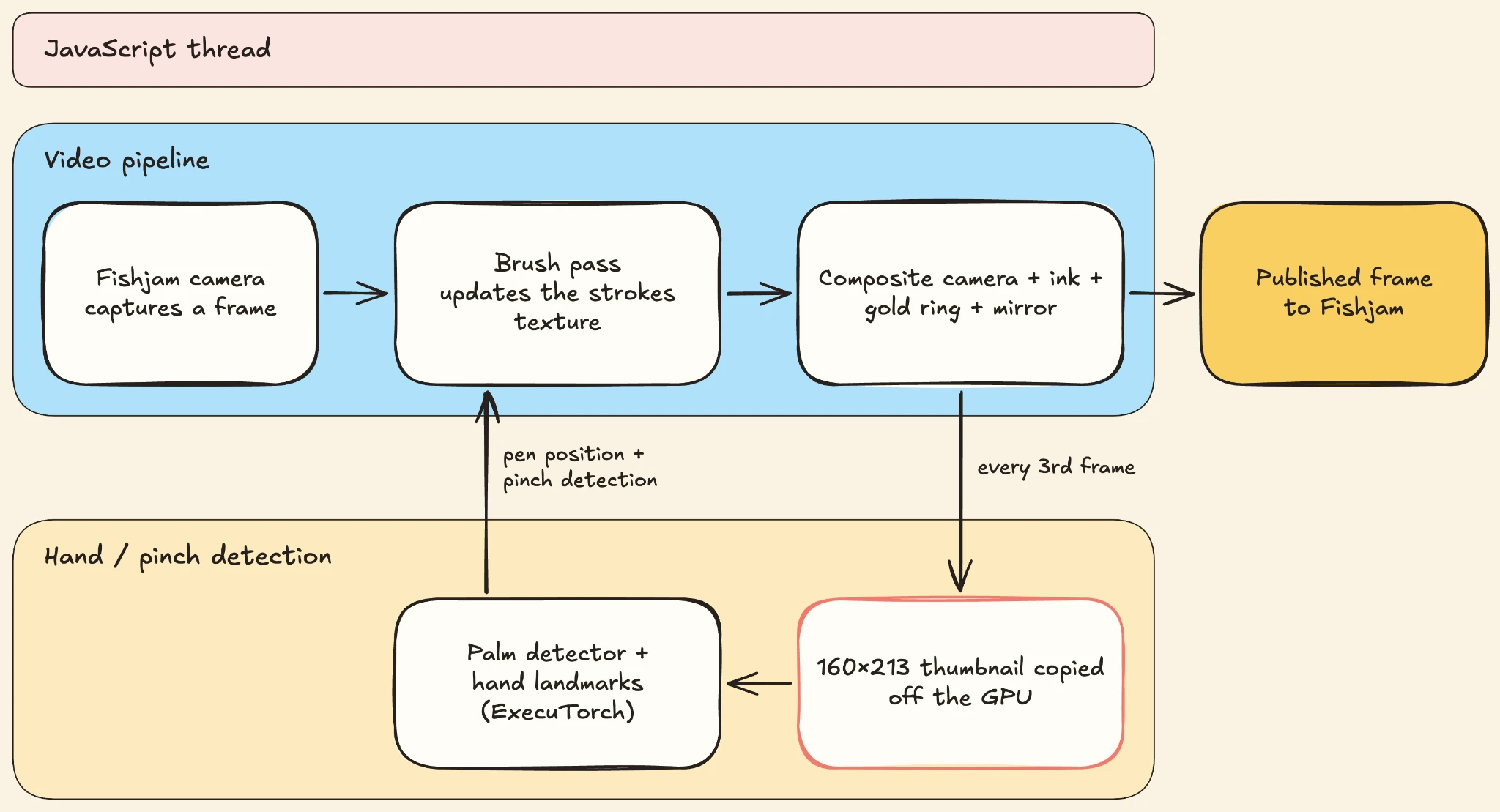
react-native-worklets handles timing. Camera frames arrive every few dozen milliseconds while the JavaScript thread is busy with the UI, so worklets let Fishjam call your code on a dedicated camera thread instead.
What none of these libraries do is the piece in the middle: getting the live camera into a shader, and getting the result back out as a WebRTC track. That part is ours, and we got it wrong the first time.
Using Fishjam’s Own Camera
Our first version was built on VisionCamera, Marc Rousavy’s excellent camera library, which got us to a working prototype fast. But it replaced Fishjam’s camera instead of working with it. Every app that wanted a blur had to adopt another camera library. Worse, other participants received that video as a custom track rather than as the user’s normal camera, so the receiving side had to change too. That’s a lot of work for a feature users think of as a plug-and-play.
So we moved the effects onto Fishjam’s own camera. Your app keeps its existing camera code, other participants receive the result as your normal video, and full-resolution frames stay in GPU memory from the camera all the way to the video encoder. If your app already uses VisionCamera, that integration is still there.
The Client’s Second Request
Back to the client, who wanted an image instead of a blur. The segmentation model didn’t need to change, and neither did the camera or the encoder. Only the shader that combines the person with the background did, and in @fishjam-cloud/video-effects the new one sits directly below the blur shader.
That settled the client’s request. We still wanted to know whether an app could build an effect nobody had planned for, on the same pipeline.
Inkfish
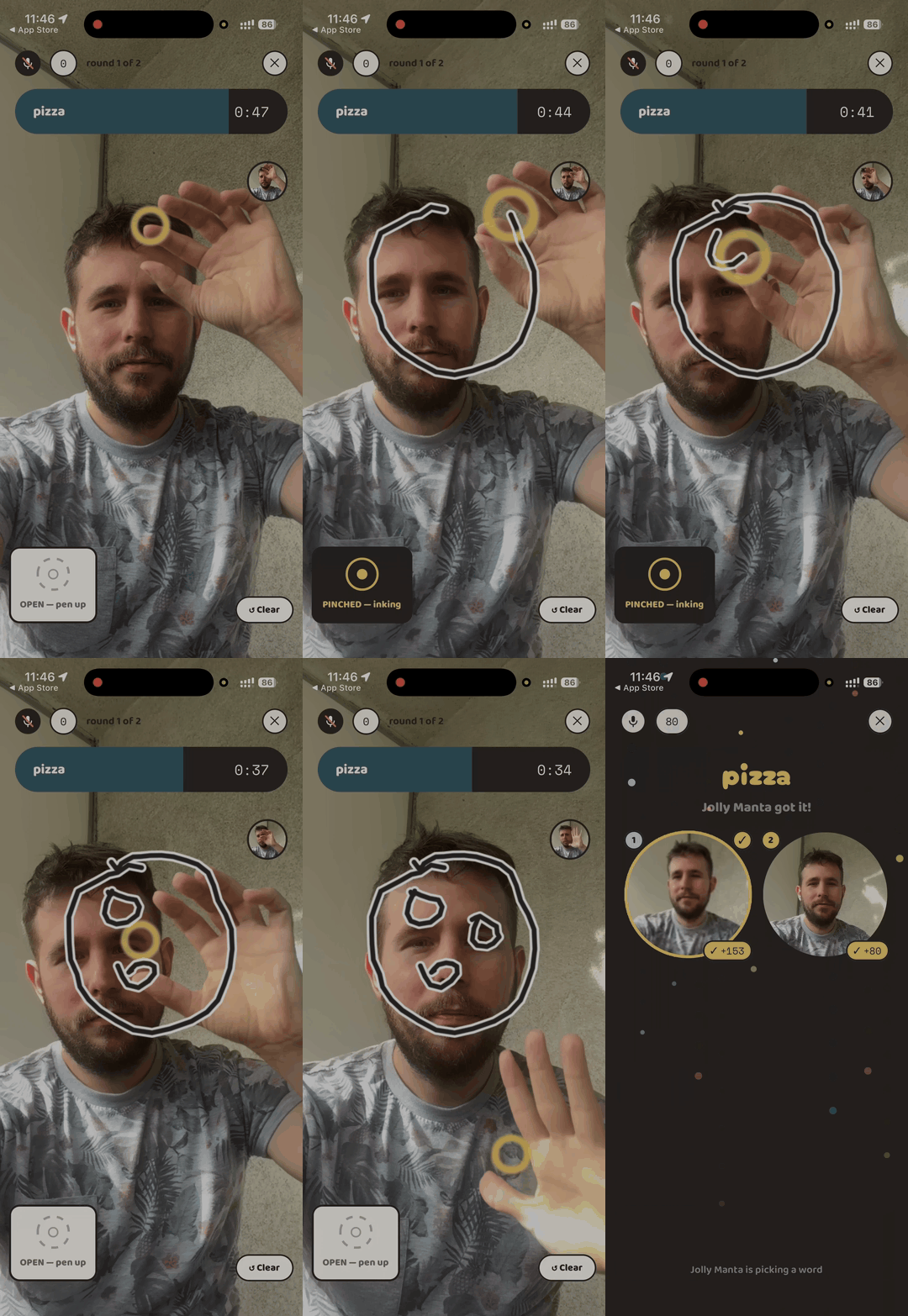
So we built one: Inkfish, charades played through your camera. You get a word, hold up your hand and pinch your thumb and index finger together to put the pen down. A line appears in the air in front of you, on the video everyone else in the room is watching. They shout guesses, the phone listens, and the first right answer scores.
Inkfish plugs into the call the same way the blur does:
const middleware = useMemo(() => {
  return async (rawTrack) => {
    const session = await createCameraFrameProcessorSession({
      track: rawTrack,
      device,
      width: OUTPUT_WIDTH,
      height: OUTPUT_HEIGHT,
      frameKernel,
    });
    return { track: session.track, onClear: () => void session.dispose() };
  };
}, [frameKernel, device]);
The function is copied to the camera thread when the effect starts and runs there from then on, so the JavaScript thread never touches a frame. It does two things: createCameraFrameProcessorSession is the piece in the middle we built: it takes the camera track and a frameKernel, and hands back a new track. The frame kernel is a worklet: the native capture thread hands each frame to a dedicated worklet thread, where the kernel runs, and everything Inkfish does to the video happens inside it.
On each frame, the brush goes first. The brush draws the newest stretch of line, from where the pen was on the last frame to where it is now, into a texture that keeps every stroke until the drawer clears it or the turn ends. The brush is a TypeGPU function:
const brushFragment = tgpu.fragmentFn({
  in: { uv: d.vec2f },
  out: d.vec4f,
})(({ uv }) => {
  'use gpu';
  const cur = brushUniform.$.cur;
  const prev = brushUniform.$.prev;
  const aspect = brushUniform.$.aspect;
  const paUv = std.sub(uv, prev);
  const baUv = std.sub(cur, prev);
  const pa = d.vec2f(paUv.x * aspect, paUv.y);
  const ba = d.vec2f(baUv.x * aspect, baUv.y);
  const h = std.clamp(std.dot(pa, ba) / std.max(std.dot(ba, ba), 1e-6), 0, 1);
  const dist = std.length(std.sub(pa, std.mul(ba, h)));
  const radius = brushUniform.$.radius;
  const casingRadius = radius * 1.833;
  const inkCov = brushUniform.$.draw * (1 - std.smoothstep(radius * 0.6, radius, dist));
  const casingCov =
    brushUniform.$.draw * (1 - std.smoothstep(casingRadius * 0.8, casingRadius, dist));
  return d.vec4f(inkCov, casingCov, 0, casingCov);
});
For every pixel, it measures the distance to the segment between the pen’s last two positions and paints ink if the pixel is close enough, with a white outline around it.
At most every third frame, the kernel also shrinks the camera image into a small thumbnail for the hand tracker. A few lines of WGSL average sixteen camera samples into each thumbnail pixel:
@fragment fn fragmentMain(in: Vertex) -> @location(0) vec4f {
  let texel = vec2f(1.0, 1.0) / vec2f(textureDimensions(source));
  var sum = vec3f(0.0, 0.0, 0.0);
  for (var y = 0; y < ${BOX_TAPS}; y++) {
    for (var x = 0; x < ${BOX_TAPS}; x++) {
      let offset = (vec2f(f32(x), f32(y)) - vec2f(1.5, 1.5)) * texel;
      sum += textureSampleLevel(source, sourceSampler, in.uv + offset, 0.0).rgb;
    }
  }
  let rgb = sum / ${BOX_TAPS * BOX_TAPS}.0;
  return vec4f(rgb.b, rgb.g, rgb.r, 1.0);
}
The thumbnail is the only image Inkfish ever copies off the GPU. The hand tracker then runs as a second worklet on a thread of its own.
This started with the most ordinary feature a video app can have, built twice in native code. It ended with ink drawn in the air on a live video call, from a little TypeScript that runs on both platforms.
The client who asked for a custom background can now build their own video effects, in their own codebase, in minutes.
Try It
For setup and an example to build on, see the Fishjam docs. GPU segmentation is still experimental. Or just play a round of Inkfish, on the App Store or Google Play.


